Pages

Showing posts with label Technology. Show all posts
Sunday, August 3, 2014

New job and Back to School Sale

In the world of The Bomb-Diggity Classroom, it is kinda strange that I am not getting my own classroom ready for a new group of students. I definitely would be stressing as many of you are.  I am totally loving my new job, but I am going to miss my former coworkers and the students!   

 My world recently has been getting ready for technology training in all of the elementary schools.  It's a daunting thought that I am now responsible for technology professional development...However, I am excited about all the possibilities for the upcoming year!  We will be learning all about Google Apps for Education and how to implement it in the classroom!  We also will be implementing a few other things and continuing training in some other technologies.

As we have been preparing for the upcoming year, one of the items on the agenda was to train the new teachers.  I had three sessions on Mimio, which is an interactive whiteboard application, and my partner had three sessions on Google Apps.  We both were extremely nervous since it was our first official presentations with our new jobs! 


On a different note, I would like to invite you to my TeachersPayTeachers Back to School Sale coming up August 4th-5th.  Stop by to pick up your back to school items.   


                                              300 × 300

Till next time...


Thursday, July 17, 2014

Five for Friday...Well, The Whole Summer Really...


Hi everyone! I know, what's up? I haven't blogged since Mother's Day! Sooooo, I guess it's about time!!

I'm linking up today for Five for Friday with Doodle Bugs Teaching, but it's a post not for just one week. It's for the WHOLE summer!
                                             fiveforfriday2_thumb3_thumb3

First up, I was honored with being named my school's Teacher of the Year! It was such an honor! We have some amazing teachers at my school so I was so surprised! My principal actually called my husband and told him and then surprised me during my end of the year celebration!  He and the boys even kept it a secret!!


Next up, I had applied for a new job as a system-wide technology coach.  I found out that I was one of six finalists for an interview.  I had not interviewed for a new job in over 11 years!  I was a bit rusty!  In fact, my interview started out horribly!  I had to do a 5 minute introduction about myself and then a 10 minute demonstration of a Google App since we are a GAFE school.  In the first 5 minutes, I tried to put my flash drive in the wrong port and then, I CRASHED the computer!  Really?!?!  The interview could only go up, right???  Thankfully, it did.  During the demo, I taught the interview committee something they didn't know about the Gmail!  The IT director knew, but the others didn't so I felt really good about that!  However, the first part of the interview still loomed over me.  Stayed tuned till the end of the post to find out the results...

A very sad part of my summer was that my husband's dad passed away.  He had been off and on sick for about 2 years and my husband's mom has been taking care of him.  In June, he was hospitalized, went to a nursing home for rehab, relapsed, and  passed away in the span of 3 weeks.   It was the first loss of a parent for either my husband or me so it has been quite an adjustment for all of us, but everyone's doing okay for the most part.

We have also been on vacation already this summer.  We had a great time. We had lots of beautiful weather, sun, sand, and time with family and friends.  


And finally, the results of my interview...

I got the job!!!!  Even after the horrible start to my interview!  When I called my husband, he said, "Sooooo, everyone else did worse than you???"  My response was, "I guess so!"  Another lady and I were hired to split the schools in our county and as we have been talking about the job, we also have discussed our interviews.  She went home and cried because she felt hers went horribly too.  We have laughed that we are the best of the worst!!  I am so excited about this new challenge, but I have a HUGE learning curve to get through! 

I haven't really decided what to do with this lil old blog, but I would like to continue it with commentary on how our school system is implementing GAFE (Google Apps for Education) and how to effectively use it impact instruction.  

Stay tuned!

Till next time...
Sunday, October 27, 2013

What? What? A New Blog Post??

         October has almost passed right on by and not a peep from this blogger!  It has been crazy busy as I know you already know.  It seems when back to school time and then Fall hits, there is no time for anything, but I am determined to slow down and smell the apple cider!  (I would've said the pumpkin spice, but I can't figure out what that craze is all about - not a fan of pumpkin! GASP!!!)

      Our school celebrated Red Ribbon Week all last week.  Each day, we had a special day and/or event planned.  Monday, was Wear Red Day.   Look at these little cuties all in their red!


      I also found out on late Sunday into Monday that my DonorsChoose project had been funded by Sonic!  Oh happy day!  It was an even better surprise to find out that it would be delivered within days.  Gotta love DonorsChoose and Sonic!!  Plus, our 2nd grade team was chosen for a Partners in Ed field trip grant!  We were soooo excited!!  

      Tuesday was our World Series of Reading day.  Our fabulous media specialist always plans for all day reading contests within our school during the World Series and the SuperBowl.  She splits up the school into two teams and we read all day!  The kids have a blast and the team with the most points wins a treasure tower token!  They think that is great!!  This year, some of my sweet kiddos I had previously got to come and be buddies with some of my students this year!  
                     

          We also had a door decoration contest.  One of my fabulous parents did this door for me and we came in first place!!!  Love!!!

      All week long, students have been purchasing strips of duct tape to tape our principal to the wall and for a teacher to kiss a goat!  Thank goodness, I didn't win the kiss the goat contest!  I was worried for a minute that I was going to have to do that!  At least, it was a baby and not an adult goat!!!

      Here's our principal stuck to the wall!

      To end up our very busy spirit week, we had a masquerade dance.  Our art teacher had them create masks to wear during the dance.  Students paid for a wristband to get into the dance and then they jammed out for an hour and a half!      Look how cute they are in their masks!


      Now, you can see why I've been an absent blogger!  This is just one week and I know your weeks are like this too!  

      Hope you have an awesome week ahead and remember to slow down and enjoy!

Till next time...

Tuesday, August 20, 2013

Happy, Happy, Happy for Place Value!

Hi y'all!

      I'm stopping in quickly tonight to share some fun place value task cards that I set up for my class to use! They will be happy, happy, happy when they see these Duck Dynasty themed place value task cards!
Who doesn't LOVE Duck Dynasty?!?!

      I have created two versions.  The first version is just regular task cards with a recording sheet.  The second version has a QR Code checking option.  They are aligned to 2.NBT1 and 2.NBT3.

      Just click on the pics to take you to either version.


**This 2nd version is the exact same set, except that it has a QR Code checking option.


And, for sticking with me through this post, the first 3 comments will get the set of your choice!  Just leave your version choice along with your email!
Whoo-hoo for FREEBIES!!

First 3 comments - GO!!

Till next time!

Tuesday, July 30, 2013

Tech Tuesday - Group Maker {AND a FREEBIE!}

      Happy Tuesday!  It's my last Tuesday before I have to start back for pre-planning!  :(     This summer has passed by sooooo quickly.

      I wanted to share an app I found that can help you quickly and randomly group your students.  Sometimes, you just need to break up into groups for various reasons - they need to be grouped heterogeneously.  This little app called GroupMaker will do that for you very quickly!

      I'm going to attempt to walk you through setting it up.  :)


This is what the app icon looks like.  Once you click on the app, it will guide you to name your class.  You can have multiple classes loaded into the app.  Once you name your class or classes, you will come to a screen that looks like this:

      The Edit button at the top left gives you the option to delete the class.  The New button is where you can add additional classes.  

      I just need one class so I would just touch my class.  That leads me to the next screen where you start adding in your students.  

      When you touch Add Member+, it asks for first name and last name so it's up to you if you add the last name.  I wanted them sorted alphabetically by last name so I just put the last initial.  This app gives you the option of adding the gender and race of each student.  You just click on the little arrow by each student's name.  
BTW, Tiger is my D-O-G!  

        If you choose to do that and it's complete, the next step is to group your students!  Whoo-Hoo!!  This app allows you to group from 1 up to 20!  (I'm not sure why you would need the setting for a group of one, but hey...who am I to argue?!)


      As you can see from the pic above, I grouped my class into groups of 4.  In order to change the number in each group, all you need to do is slide the little slider up at the top.  As you can see, this is where you can also account for gender and race.  I'm not sure why you would need the sort randomly toggle because if it's off, it's already sorting randomly.  As for the miscellaneous toggle, I have no idea.  On the screen where you put the race and gender, there is a place for miscellaneous, but I'm not sure how to use it!  If you figure it out, let me know!!!

      All in all, this is a cool, little app for the times when you need to group students quickly and randomly.  It is a little time consuming inputting all the information in, but this is the time of the year when we have to put their names on and in everything, so what's one more thing?

      Try this app out and let me know what you think!

Oh, I almost forgot...I have a little freebie for you.  Pennants/buntings are all the rage so I whipped up a get to know you pennant for my class.  Each kiddo will complete it and decorate it and I will display it for a great back to school display.  Enjoy!!


Till next time...

Tuesday, July 23, 2013

Tech Tuesday - Remind 101

      Ok, am I the O-N-L-Y one who didn't know about Remind 101. I saw a pin from Mrs. Stanford and knew that I needed to learn more!!  I am so excited to use this great communication tool with my upcoming class! I am so excited, I even made my hubby sign up just so that I could try it out!!  LOL!!

This is the app icon.  :)

      There is an app as well as a website and it is SO easy to set it up regardless of what platform you use.

      First things, first.  You must set up an account and then you add your class name.  A teacher that has multiple classes can set up to 10 classes.  I thought this was great for middle and high school teachers who have lots of classes.  It would also be great for those elementary grade levels that departmentalize.

      Next you invite your parents/students to subscribe.  If they text the code, they will receive their updates via text.  If they email the code, they receive their updates via email.

      Oh, and this is a one-way communication.  It is only for reminders, announcements, etc.  Parents/students cannot text you back through this medium.  So, your number stays private and others' numbers are not published!


      Remind 101 provides you will a flyer to share with your parents so that they can subscribe either by email or text.  It is seriously so easy to set this up!  

      Once a parent/student subscribes, they will see a text or email that looks like this:

This is the where I got my hubby involved!

      Once he sent his name, the web and app both updated listing him as a subscriber.  It automatically adds them to the subscriber list.  I didn't have to do anything in that regard.

I, then, sent him a test email and he received it very quickly!  Love this!!

      You'll notice on the pic above that my username is @rhar.  I did not like that!  On the help menu on the website, there is a step by step way that you can fix that so I just  followed those simple directions and got it the way I wanted!  :)  [The first class that you create, they will automatically set up your username.  You just have to create a new class with the username of your choice.  Then, you can delete the other class if you want.]

      I have this app already sitting in my teacher folder ready to go for the new year!!


      Hope this little tutorial/review helps.  I know I am excited about it!


Sunday, July 21, 2013

Sunday Smorgasbord

      It is Sunday, and the end is drawing closer!  I have two full weeks until I have to go back. {Insert SAD face here!}

      I usually have my room pretty much set up by this point because I go in and piddle and plan how I want things.  BUT, this year our principal would not let us go back until July 15th.  THEN, we get an email that said we can't get in until tomorrow.  I'm a little, no A LOT freaked out!  They say we will be pleased with the level of cleanliness and I can't argue with that, but freaking out here in central GA has commenced!!  LOL!!

      I'm also linking up with Michelle at Fabulous in First for her Sunday Smorgasbord.  This is such a fun linky because I have been all kinds of random this week.  Well, it seems like every week in the summer!


      My week started out kinda yucky because I was in a 3 day workshop.  We had reps from different school's within our district.  We had to create our district's Student Learning Objective (SLO) assessments.  This was some hard-core work.  The state department rep was there.  We had a 5 page checklist that we had to complete in order to be checked out on Wednesday!  It was all kinds of CRAY!!  I know you hate that I didn't get any pictures of this awesome adventure, but you know...We had to sign a confidentiality agreement so I didn't want to get in trouble!!

      I also discovered that I must have been living under a ROCK because I had never heard of the fabulous app/website called Remind 101.


      Why, oh why, did I not know about this?  This app allows you to communicate quickly with your parents.   I have a review coming up this Tuesday so stay tuned!  I seriously think it is going to change how I, and maybe you ;) communicate with your parents!

      My next big thing this week is that I bought one of those great home laminators!  I saw on Instagram where I Love My Classroom found one at Walgreen's on clearance so I raced to Walgreen's only to find that my store did not have them on clearance.  I didn't realize they were only 30 bucks in the first place so I snatched it up even though it wasn't on clearance.  I really love it and I've only had it for a few days!!

Laminator L-O-V-E


      Now, head over to Fabulous in First to see what other randomness happened this week!


Monday, July 1, 2013

Currently...It's Monday Made-It {July 1}

      Two of my most favorite linkys happen today!

Farley's Currently ANNNDDDD, it's time for Tara's Monday Made-It!!

First up-----July's Currently!


      Currently, I'm listening to Duck Dynasty.  Who doesn't love that show?!  It just makes you Happy, Happy, Happy to see such a fun family!

      I'm loving summer, but man!  It needs to seriously SLOW down!!  I mean, come on!  It's July already!  It seems like I was just doing Roller Chair Races for the end of post-planning just yesterday!  

      I am seriously longing for the beach, but it will have to wait!  We aren't going for another couple of weeks!  {Big sigh, right there!}

      Last night I did need to go to bed, but what was I doing?  Creating my Currently instead.  

      In this whole blogging experience, you should always make sure you are having fun and definitely be yourself!!  If you're not doing either of those, you won't enjoy it like you should and it will become a chore!

      Now, onto Monday Made-It!  


Monday Made-it #1:

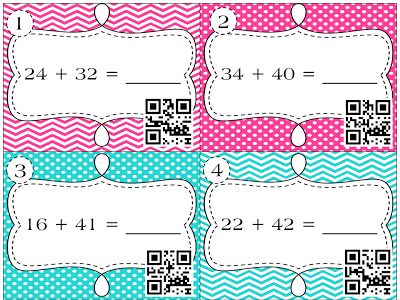
      I've been wanting to do some dabbling in creating things for my classroom using QR codes sooooo.... this week, I made some an awesome little set that I plan on letting them use during math centers.  They are for addition within 100 with no regrouping!  They can be used in some many different ways!  Love them and I think my students will absolutely love these!!  If you would like them for free, be the first 3 to comment!! :)


Monday Made-It #2:

      Ok, so I found this great magnetic board last week.  I didn't get it and it has been on my mind ever since.  So, today, back to TJMax!  I think it is great!  The finish is kind of a turquoise that has been roughed up a bit.  Shabby chic love!  


      This beauty didn't come with any magnets and I've been wanting to make these glass blob magnets.  This was the perfect time!  I had some cute scrapbook paper and some peel and stick magnets.  I stuck the magnet on the scrapbook paper and cut around it.  Then, I placed a dab of hot glue on the the scrapbook paper side of the magnet and stuck the glass blob right on top, pressed down, and Voila!  A cute little magnet for my new board.  I can't wait to hang it in my classroom!

Just noticed I need to trim up that chevron one!  Ha!


Head over to Farley and Tara's to check out their awesome linkys!

Till next time...
Robin


Friday, June 28, 2013

Five for Friday...Wait! What? It's Seriously Friday?!?!


      The last Friday of June is among us!  I can't even believe that!  I have always felt that once we get to the 4th of July, summer is almost over...and July 4th is NEXT week!!!!   This year, we don't go back until the middle of August so we get a little more time for sweet summa time!

      Friday also means it's time to link up with Doodle Bugs Teaching for Five for Friday!  Whoo-hoo!

                                               fiveforfriday

      One of the places that is a must visit place {{many times}} is Crystal Springs Recreation.  It is about 35 minutes away and it is a pool that is spring fed.  The water is a constant 66 degrees all year long!  On our H-O-T Georgia days, that feels heavenly!!  Crystal Springs originally opened in 1859!!!  Of course, from the pic, you can tell they have made many improvements over the years!


      On Wednesday, my son had his last double header of the school summer league.  He got to show off his talent in several positions!  In the first game, he got to play 2nd base, pitch, and catch!  In the 2nd game, he just caught.  That's his normal position and I love to see him do his thing behind the plate!


      On Thursday, Mac and I, and my bestie went to the Atlanta Apparel Mart!  This is where all the boutiques get most of their merchandise.  My bestie owned a little children's boutique and we are still considered buyers!  Whoo-hoo!  It's just not summer if we don't make a couple of trips to the mart!!!!!  I hardly EVER pay retail for any type of jewelry!  The JCrew bubble necklaces that sell for $150, I got for $5.99.  That's right - less that 6 bucks!  They have costume jewelry and fine jewelry.  You can see some of the costume jewelry on Mac!  He had to put a little BLING BLING on!


      We also had to have a little lunch while in the ATL so we stopped by Hard Rock Cafe.  It was the first time I had ever been to this Hard Rock!  It's way bigger than it looks and we decided we'd like to live in one of the apartments above it!

      I also have been wanting to dabble in creating QR code activities for Teachers Pay Teachers.  I created this I Spy QR Codes Addition for addition within 100 (no regrouping).  I cannot wait to let my kiddos use it!  The first 3 people to comment with their email addresses will get it free!  Yippey!!!


      Our washer has been acting a little wonky.  The repairman came today and look what he found in the drain hose!  Yuck!  About 4-5 dollars, an earring, paper clips, and the torn off section of an Under Armour shirt!  That's why the washer was acting wonky!  Then, when I went to wash after the repairman left, my washer leaked all over the floor!  Thank goodness I was watching it and caught it before it was horrible!  Needless to say, the repairman is coming back tomorrow!

Sorry for the blurriness! You can still see how yucky!!

      And last, but not least is coming this weekend is...DUH, DUH, DUHMMMMM...the end of Google Reader!  If you haven't followed me over on Bloglovin, please do that before the end of Google Reader as we know it!  You can push that button over on the right OR click on the picture below!  Easy-Peasy!!


      Have a GREAT weekend!!

Till next time...

Robin


Blogging tips